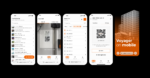
Voyager on Mobile
Introducing Voyager on Mobile: Scan a QR code and get the full story on any asset, right where it sits.
Your Team Deserves Answers at the Asset
You run facilities so the building performs: uptime stays high, maintenance stays ahead of failures, and nobody gets surprised by equipment they didn’t know existed. To do that, your team needs one thing above all: accurate information about the asset in front of them, at the moment they’re standing in front of it.
That’s the promise of a digital twin. Until now, most of that promise lived on a desktop.
The Problem: Your Data Lives at a Desk. Your Assets Don’t.
Walk any facility and you’ll see the gap. A technician stands at an air handler with a work order and a question, while the answer sits in a database back at the office. So they radio a coordinator, photograph a nameplate, or walk back to a workstation to look it up. Multiply that by every task, every day, across every building you operate.
It’s more than an inconvenience. It means the person closest to the asset has the least information about it. Field teams end up working from memory and guesswork while the “single source of truth” stays parked where nobody in the field can reach it.
And it shouldn’t work that way. You already paid to capture this data: the models, attributes, equipment documentation, maintenance history. The information exists. It just isn’t where the work happens.
What That Gap Actually Costs
The costs are easy to underestimate because they arrive in small pieces:
- Lost time. Every trip back to a desk or radio call to confirm an asset detail is crew downtime, multiplied across every technician and every shift.
- Decaying records. When updating the system means a walk to a workstation, updates don’t happen. Assets get replaced, records don’t, and the twin drifts away from reality.
- Slower response when it matters. During a failure, the time spent identifying an asset and pulling its history is time the building spends down.
A digital twin that doesn’t reflect the field stops earning its keep. The data is only as valuable as it is reachable.
The Fix: Put the Digital Twin in the Field
The fix is direct: bring the asset data to the asset. Tag every piece of equipment with a unique identifier, link it to the record, and give the operations team a way to open the full context of that record (and all information attached to it) instantly.
That’s exactly what the new Voyager on Mobile does. It puts the full asset record on your phone: complete attribution at the point of work, plus the tools to generate, manage, print, and scan the QR codes that tie those records to your equipment. Print a QR code sticker, place it on the asset, and from that moment anyone with a phone camera and the right permissions can pull up and update the asset’s complete digital record with a single scan.
Scan and Go
Asset identification is built to be as fast as possible. Scan the QR code with your phone’s camera and you land directly on the asset’s details: the right client, the right project, the right asset. No searching, no menus, no calls back to the office. Access permissions carry over, so users only see what their account allows.
Full Attribution, Right at the Asset
Voyager on Mobile is more than a QR scanner. Every attribute you can see and edit on desktop, you can see and edit in the field: specs, statuses, maintenance details, whatever your team tracks. When a technician spots a discrepancy, they fix the record on their mobile device while standing at the equipment, instead of carrying the correction back to a desk and hoping it survives the trip.
Map Codes to Assets in Seconds
Assign new or existing QR codes to assets. Select an asset in the app and it prompts you through the mapping. Then print the sticker and place it on the equipment. Every sticker carries a unique QR code ID, so codes stay identifiable even when you bulk-print hundreds at a time.
Replaced the Asset? The Sticker Still Works
Assets get swapped out and stickers stay behind. Because each code has its own unique ID, scanning a sticker with no assigned asset doesn’t dead-end. The app walks you through linking that old code to an existing asset on the spot, so your tagging investment survives equipment turnover.
Create New Assets on the Go
Found equipment in your facility that was never entered into the system? Create the new digital record from the asset list on your Mobile device and complete its full attribution on the spot, with the same attributes available on desktop. Generate a new QR code for it, assign an existing one, or leave it untagged until you’ve decided. The record starts at the asset, not at a desk 3 buildings away.
See It on Your Own Assets
Your team is already in the field every day, standing next to equipment your data should recognize. Every week the field and the record drift further apart and closing that gap only gets more expensive.
Request a Voyager demo and we’ll show you Voyager on Mobile running on assets like yours: scan, identify, update attributes, and move on. Visit viatechnik.com or contact our team to schedule it.